
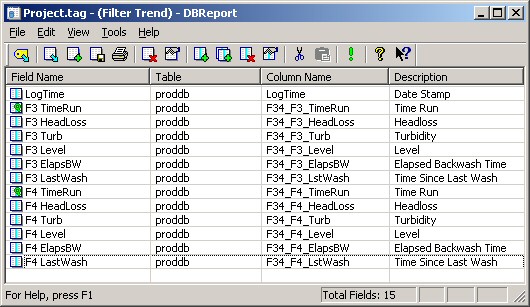
DBReport is used to construct a variety of reports from one or more database tables and
offers seamless connectivity to Microsoft Excel through COM technologies. Fields are
selected using a point and click table browser allowing process information to be
analyzed quickly and efficiently.
offers seamless connectivity to Microsoft Excel through COM technologies. Fields are
selected using a point and click table browser allowing process information to be
analyzed quickly and efficiently.
Click Image for a Larger View
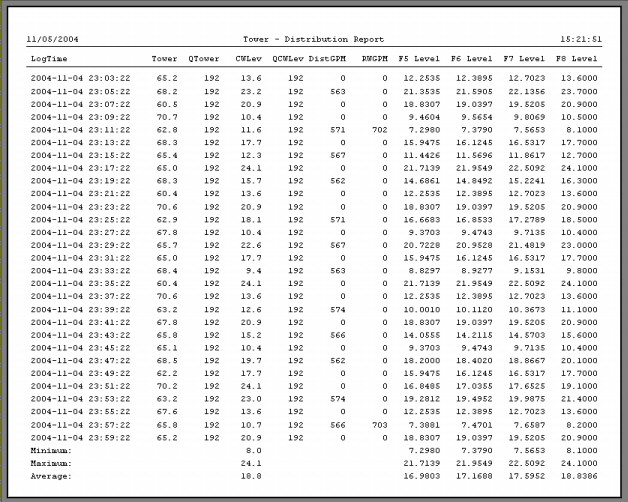
Templates are provided for series of report types allowing different views of process
information to be generated in a matter of minutes. Data from multiple tables can be
joined into a single report offering extreme flexibility in the organization of information
with DBEdit.
As reports are created, they can be grouped into categories simplifying the task of
selection during plant operations. Basic statistics may be incorporated for calculating
totals and averages and finding the minimum and maximum value of a given column of
data.
information to be generated in a matter of minutes. Data from multiple tables can be
joined into a single report offering extreme flexibility in the organization of information
with DBEdit.
As reports are created, they can be grouped into categories simplifying the task of
selection during plant operations. Basic statistics may be incorporated for calculating
totals and averages and finding the minimum and maximum value of a given column of
data.
Click Image for a Larger View
Advanced reporting capabilities are provided through Microsoft Excel connectivity.
DBReport can export information into Microsoft Excel providing a powerful environment
for analyzing process data. Information is dynamically written to a "raw data" Worksheet
which is linked to other Worksheets containing reports and trends.
Running Excel reports is accomplished by simply providing a date range and clicking
DBReport's Run button. Once the data query has completed, the operator is presented
with the Excel Workbook positioned to a pre-configured Worksheet.
Since CPUtilities maintains all process and historical data in an industry standard
database, reporting tools such as Crystal Reports and Microsoft Access may be used for
analysis purposes.
DBReport can export information into Microsoft Excel providing a powerful environment
for analyzing process data. Information is dynamically written to a "raw data" Worksheet
which is linked to other Worksheets containing reports and trends.
Running Excel reports is accomplished by simply providing a date range and clicking
DBReport's Run button. Once the data query has completed, the operator is presented
with the Excel Workbook positioned to a pre-configured Worksheet.
Since CPUtilities maintains all process and historical data in an industry standard
database, reporting tools such as Crystal Reports and Microsoft Access may be used for
analysis purposes.

DBReport